- Home
- Case studies
- Work automation
The work agent screen: chat, a minutes desk and automatic review in one place
We built a personal work agent screen that also works on a phone. It splits the worker, the reviewer and the judge, and turns an uploaded meeting transcript into draft minutes plus a review.
- AreaWork automation
- Period30 August – 5 September 2026, refined since
- ToolsClaude, Codex, Node.js, HTML Canvas
- StatusIn local use; permission policy not yet built
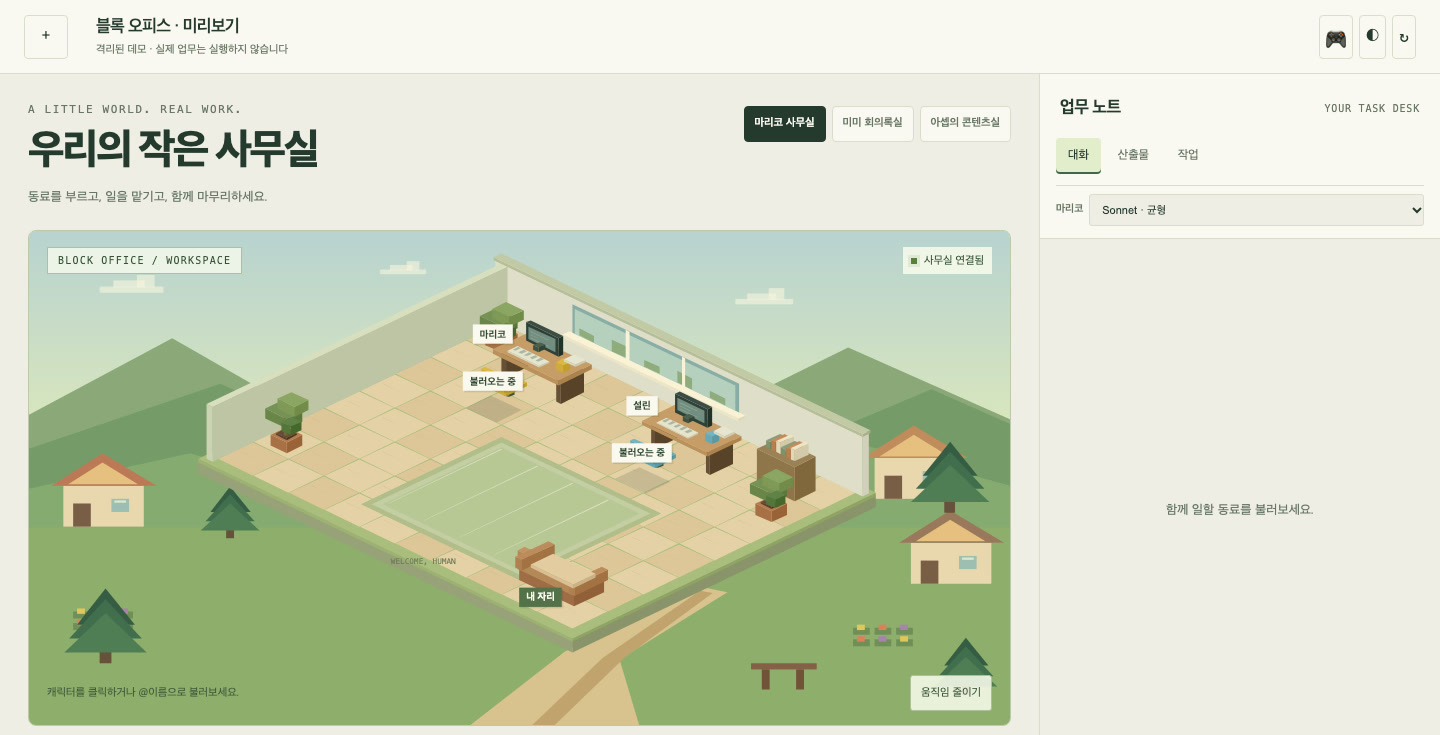
We had only been using AI agents from the command line, so we built a web screen that lets us call them from a phone as well. Several agents sit in one chat room, and when one of them answers, another reviews the answer automatically. The same screen has a desk that turns an uploaded meeting transcript into minutes.
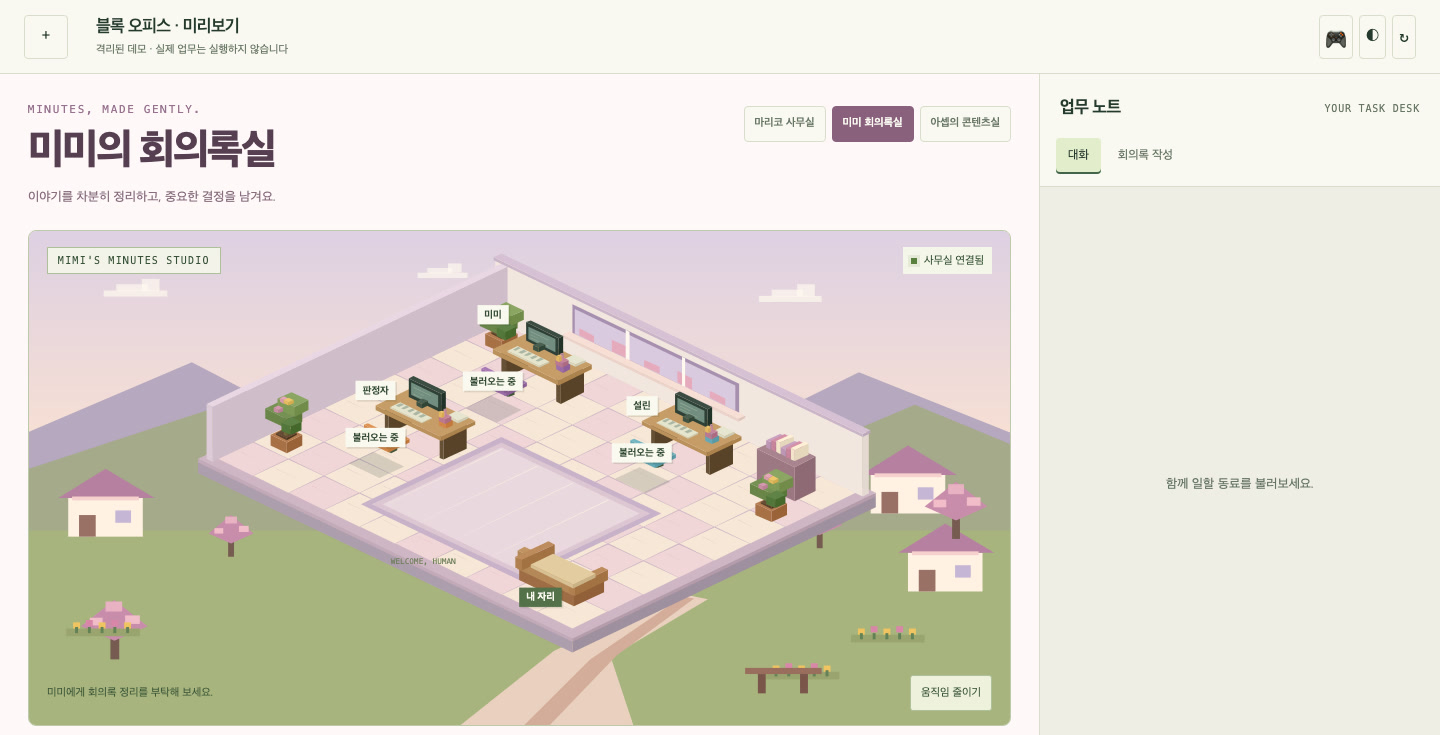
The project's design documents, screen design notes, source code and test notes. We re-ran the automated tests while writing this. The character art used on the screen comes from a third party, so it is hidden in the captures below.
Roles
| Role | Model | What it does |
|---|---|---|
| Main worker | Claude | Conversation and handling requests |
| Minutes writer | Codex | Drafts minutes from a transcript and a template |
| Reviewer | Codex | Reviews the result and points out problems |
| Judge | Claude | Reads the review and decides whether a fix is needed |
By design the reviewer is always read-only. It cannot change the result itself and can only point out problems.
If a message addresses an agent by name, that agent answers; otherwise the main worker does. Each role's name and tone of voice can be changed in a settings file.
The minutes desk
Minutes are handled at a separate desk from the chat. It accepts three files.
| Input | Format | Required | Size limit |
|---|---|---|---|
| Meeting transcript | Text file | Required | 8MB |
| Minutes template | File | Optional | 12MB |
| Writing guidelines | File | Optional | 2MB |
The template and the guidelines come from the user. Minutes look different at every company, so the agent does not decide the format; it follows the template it is given. The flow is draft, review, verdict: the minutes writer drafts, the reviewer checks, and the judge decides whether anything has to change. The result is downloaded from the screen.
Uploaded file names are reduced to safe characters, and inputs are stored by role in a folder labelled with the date and a unique number.
A screen that shows who is working
With chat alone it is hard to tell who is doing what right now. So we drew a small office on the left of the screen. Each agent has a room and a desk. When called it walks over, when given a task it goes to its desk and works, and when finished it comes back with the result. The right side is the real input and output of the work.
We kept to these rules when building it.
- Visible state changes only on real events. An agent goes to its desk when a run has actually started and comes back when it has actually finished.
- No invented progress. We do not draw progress we cannot know, or tool activity that did not happen.
- A dropped connection is shown as dropped. A disconnected state is never made to look like success.
- Calling is not running. Clicking a character to call it does not start the agent; a task has to be sent.
- A refresh picks up where it left off. Reopening the screen mid-task restores where the run is and its state.
It is drawn with the browser's built-in canvas, with no external graphics library. On devices set to reduce motion, agents move straight to their position without the walking animation.
Verification
All 28 automated tests pass; that is the result of re-running them while writing this. They run with no external packages, create fictional settings, conversations and uploads in a temporary folder, and send real requests to check behaviour. Model execution is replaced with a mock, so the tests never call a real model.
The tests cover the following.
- Stopping a task: output so far is kept, the automatic review is cancelled, and the run slot is freed
- A run slot that prevents several tasks from running at once
- Blocking a conversation reset during a task, and resetting after it ends
- Recovering a missed completion notice after the connection drops and returns
- Refusing downloads of files outside the output folder
- Handling Korean text that arrives in fragments without corrupting it
- Upload paths per role
We confirmed that the screen does not overflow horizontally at a phone width of 390 pixels.
A screen where a person picks from the review
Problems found in review are not fixed straight away; we added a step where a person chooses. In one code review, seven problems came up. The screen lists all seven and asks for "fix" or "hold" on each. Once chosen, the selection is turned into a task request, and the fix starts only when that request is handed over.
Why we added this step, and how we split permissions into three grades, is written up in Why we split the work agent in two (Korean).
What does not work yet
- The permission policy and approval screen exist only as a design. The structure in which actions such as sending email run only after approval is specified in documents and not yet written in code.
- Mail and file tools are not connected to the chat. Mail triage runs separately, with a single worker, and not through this screen.
- Access is limited to the same network. Access from outside and authentication come in a later phase.
- The tests do not verify layout or real model integration. They check server and screen behaviour against a mock.
What we take from this
Harder than running several agents was showing their state honestly. Drawing progress that did not happen looks good, but the user can no longer trust the screen. We apply this standard across our work agent: what the screen shows has to be what actually happened.